15 Stylish Gaming Room Ideas for a Space That Feels Truly Designed
A gaming room can have expensive hardware and still feel unfinished. The difference usually comes down to the space around the setup. A clear layout, controlled lighting, useful storage, comfortable seating, and a few personal details can make the whole room feel intentional.
That is the real appeal of good Gaming Room ideas. They are not only about RGB lights or impressive equipment. They make the room work for long gaming sessions while still looking like part of the home.
Below are 15 practical ideas that help a gaming room feel designed rather than assembled piece by piece. You can borrow one idea or combine several depending on your room size, budget, and gaming style.
1. Start With One Clear Gaming Zone

The strongest gaming rooms usually have a visual center. Instead of spreading the desk, screens, shelves, and accessories across the room, create one defined gaming zone.
Place the desk against the most useful wall and keep the main screen area visually organized. A rug underneath the chair can help define the zone without adding another piece of furniture. In a bedroom, this approach also keeps the gaming area from taking over the entire space.
I’ve noticed that even a simple setup feels more polished once everything clearly belongs to one area.
2. Choose a Color Palette Before Buying Decor

Random colors are one of the quickest ways to make a gaming room feel thrown together. Pick two or three main colors before adding accessories.
Black, charcoal, warm wood, and soft white create a mature foundation. Navy, forest green, burgundy, or muted purple can add personality without making every surface compete for attention.
Let the largest pieces establish the palette first. Then repeat those colors in smaller details such as desk accessories, artwork, cushions, and storage boxes.
3. Use Lighting as Part of the Room Design

Lighting should do more than make the room glow. It should help create depth and make the gaming area comfortable after dark.
Try combining one main ceiling light with indirect lighting behind the desk, under shelves, or along a wall. If you like RGB lighting, choose one dominant color at a time instead of using several unrelated colors.
Warm ambient lighting can also balance the cold look that screens and LED strips sometimes create. A small floor or table lamp can make the room feel more like a living space and less like a computer station.
4. Make Cable Management Part of the Layout

Cables are a small detail with a surprisingly large visual impact. Even beautiful furniture can look messy if power cords and charging cables are hanging everywhere.
Run cables behind the desk where possible. Use a cable tray underneath the desktop, clips along the back edge, and a small charging station for devices you use regularly.
You do not need expensive cable-management equipment. The goal is simply to make the technology look organized rather than accidental.
5. Give the Monitor Wall Some Breathing Room

A wall packed with monitors, shelves, posters, and lights can quickly become visually tiring. Give the main screen area some empty space.
If you use two monitors, keep their heights aligned and avoid filling every inch around them. A narrow shelf above the desk can be enough for a few carefully selected objects.
Negative space is especially useful in small gaming rooms. It lets the important parts of the setup stand out.
6. Add Wood to Soften Technology

Gaming equipment often brings a lot of black plastic, glass, metal, and glowing screens into one room. Natural wood can soften that combination.
A walnut, oak, or medium wood desktop can add warmth immediately. You can also introduce wood through floating shelves, a small side table, picture frames, or storage furniture.
This is one of the easiest ways to make a gaming setup feel connected to the rest of a home instead of looking like a separate technical zone.
7. Choose a Chair for Comfort and Proportion

A gaming chair is one of the largest objects in the room, so its shape and color matter. A chair that is too bulky can overwhelm a small space.
Look for a chair that supports long sessions while fitting the scale of the desk and room. If a traditional racing-style chair feels visually heavy, an ergonomic office chair can create a cleaner appearance.
Comfort should come first, but appearance still deserves attention because the chair remains visible even when you are not gaming.
8. Build Storage Around What You Actually Use

Open shelves look attractive in gaming photos, but they work best when they have a purpose. Store controllers, headphones, games, books, collectibles, and accessories where you can reach them easily.
Use closed storage for items that create visual clutter. Keep open shelves for pieces you genuinely want to see.
A useful rule is to leave some shelf space empty. A completely packed shelf can make even an organized collection look chaotic.
9. Create a Small Display With Personality

A gaming room should tell people something about the person who uses it. That does not mean covering every wall with merchandise.
Choose a small group of meaningful objects. A favorite game artwork, a few collectible figures, a vintage console, framed prints, or a small plant can provide personality without overwhelming the room.
Group related objects together instead of scattering them across every available surface. A concentrated display usually looks more intentional.
10. Treat the Desk Like Furniture
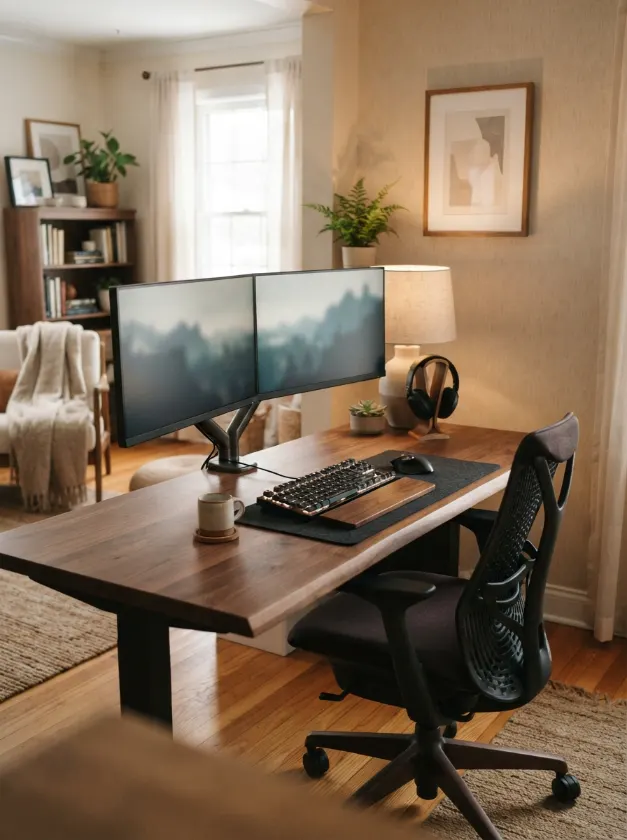
The desk is often the largest visual element in a gaming setup, so choose it with the same care you would give a dining table or console.
A clean rectangular desk works in many rooms, while a wood surface can bring warmth to a darker setup. Keep the desktop useful rather than filling it with decoration.
Leave enough space for your keyboard, mouse, speakers, and everyday accessories. A desk that looks beautiful but cannot comfortably hold the things you use is not a successful design choice.
11. Use Wall Art to Connect the Room to the Rest of the Home

Wall art can prevent a gaming room from feeling like a collection of equipment. Choose artwork that relates to your interests while also working with the room’s colors.
For a refined look, use matching frame finishes or a simple gallery arrangement. For a more playful room, mix poster sizes while keeping the color palette consistent.
If your room already has strong RGB lighting, simpler artwork may provide the visual balance it needs.
12. Add Soft Textures Around the Hard Equipment
Monitors, desks, consoles, and PC cases are visually hard surfaces. Adding softer materials makes the room more comfortable and balanced.
Try a textured rug, fabric curtains, a small upholstered chair, cushions, or a throw. Even one soft surface can change how the room feels.
This is particularly helpful in bedrooms where the gaming area shares space with a bed. Repeating a fabric or color from the bedroom can make both zones feel connected.
13. Design for More Than Gaming

The most useful gaming rooms can handle more than one activity. You might watch a movie, work at the desk, read, chat with friends, or use the room as a creative workspace.
A small lounge chair, compact sofa, or comfortable floor seating can create a second purpose without requiring a large room.
Think about how you use the room during the hours when the game is turned off. That question often reveals which furniture is genuinely useful and which pieces are simply taking up space.
14. Keep the Floor Visually Calm
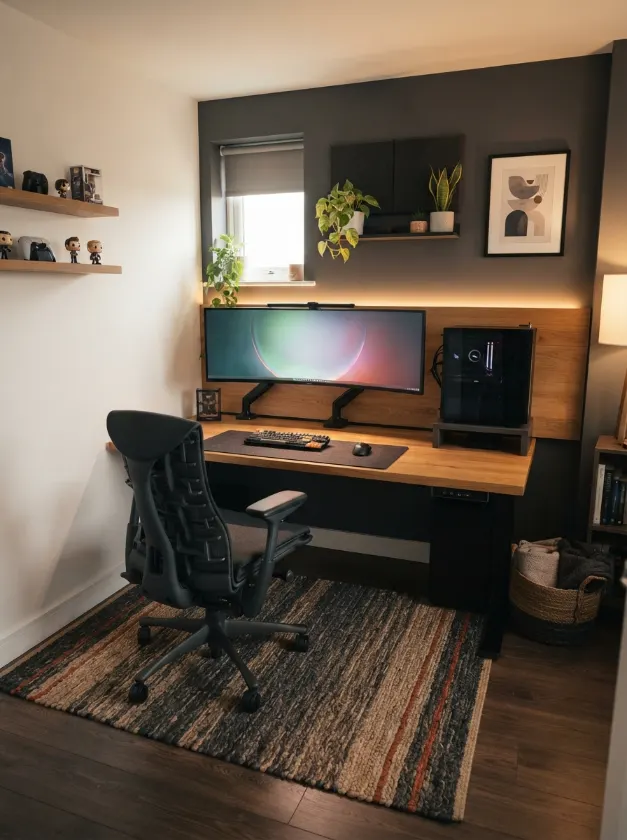
The floor is easy to ignore during planning, but it has a major effect on how organized the room feels. Too many visible cables, boxes, stands, and loose accessories can make the entire setup look unfinished.
Use under-desk storage where possible. Keep the chair’s movement path clear and avoid placing decorative objects where they interfere with everyday use.
A simple rug can also anchor the desk and provide a visual boundary for the gaming zone.
15. Finish With One Detail You Would Not Find in Every Gaming Setup

The final detail should feel personal rather than purchased simply because it is popular. It could be a vintage lamp, a framed illustration, a wooden speaker, a plant, a favorite collectible, or an unusual piece of furniture.
That one unexpected element can give the room character. It also helps prevent your setup from looking like a copy of a gaming room you saw online.
In my experience, the most memorable rooms usually have one or two details that clearly belong to the person living there. You do not need dozens of decorations to create that feeling.
FAQs About Gaming Room Ideas
How can I make a gaming room look stylish?
Start with a consistent color palette, organized cables, comfortable furniture, controlled lighting, and a small amount of personal decor. The room usually looks more stylish when you edit the number of visible objects instead of adding more.
What colors work well for a gaming room?
Charcoal, black, white, warm wood, navy, forest green, burgundy, and muted purple can all work well. Choose a main neutral and one or two supporting colors so the room does not become visually noisy.
How do I make a small gaming room look bigger?
Use furniture that fits the room, keep the floor clear, manage cables carefully, and avoid filling every wall with shelves and decor. Wall-mounted storage and a lighter visual palette can also help the room feel more open.
Are RGB lights necessary for a gaming room?
No. RGB lighting is optional. A well-designed gaming room can use warm lamps, hidden LED lighting, wall sconces, or simple task lighting. The important part is creating comfortable layers of light.
How can I make a gaming setup feel less cluttered?
Keep frequently used items within reach and hide everything else. Use cable trays, closed storage, wall shelves, and small organizers. Leave some empty space around the main monitor and desk.
Conclusion
Great Gaming Room ideas are less about buying more equipment and more about making every visible choice work together. A clear layout, restrained palette, useful storage, thoughtful lighting, comfortable furniture, and personal details can make even a modest setup feel considered.
You do not need a huge room or an expensive renovation. Start with the part that bothers you most, whether that is messy cables, harsh lighting, crowded shelves, or an uncomfortable chair. Fix that first, then build the rest of the room around it.
For more interior inspiration, you can also explore our guides to college apartment inspo and post modern interior design for ideas that can help a gaming setup feel more connected to the wider home.